Plan, monitor, and review trades with AI at your desk
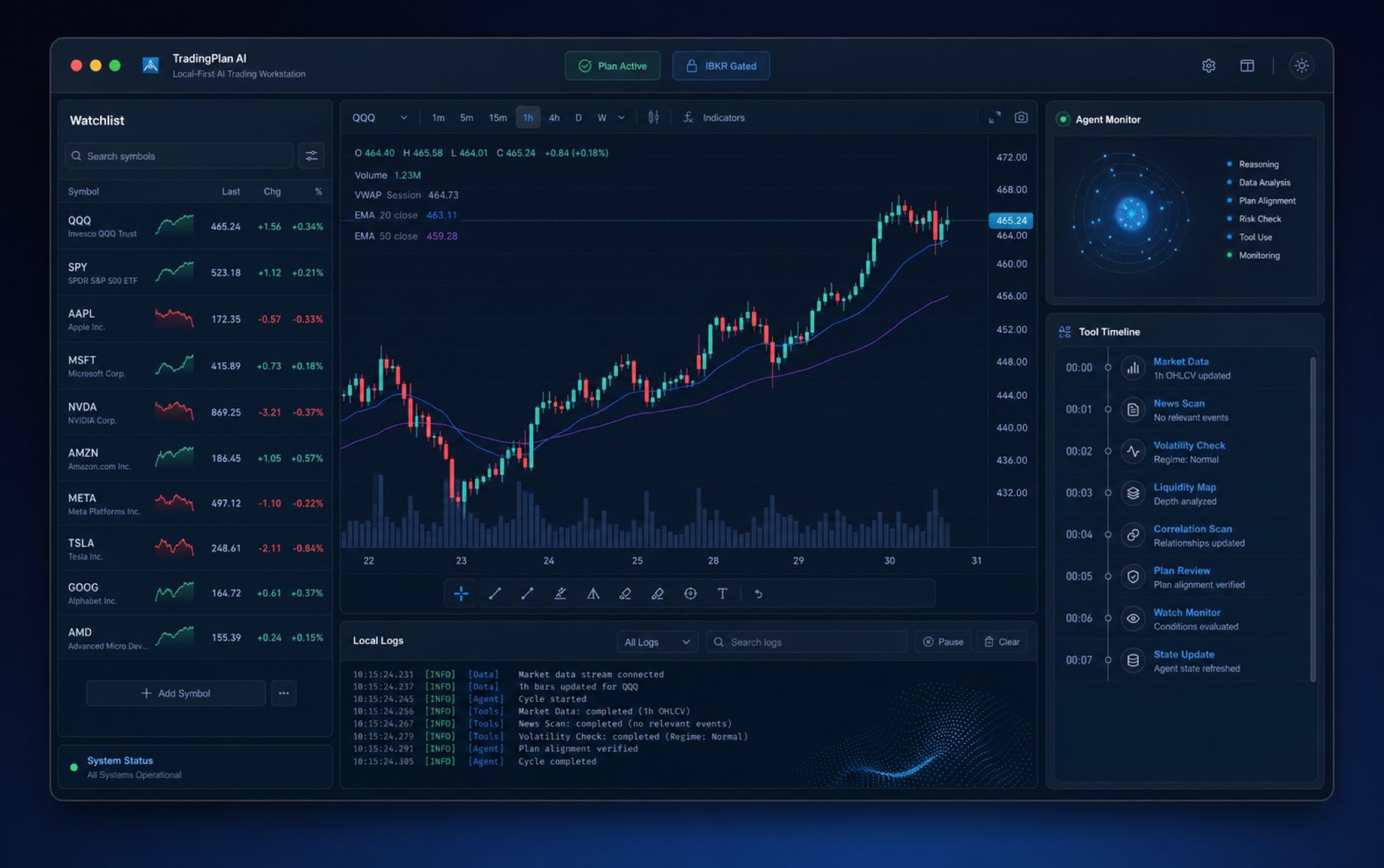
TradingPlan AI brings charting, watchlists, agent-assisted monitoring, backtesting, trading plans, and IBKR approval gates into a local macOS workflow. Your keys, logs, and execution controls stay on your machine.
Product
One desktop loop for disciplined trading
Move from market context to plan, backtest, execution review, and monitoring without handing control to a black box.
Multi-pane charts, drawings, markers, overlays, and timeframe controls for reviewing setups in context.
Track named watchlists, quote columns, provider-backed market data, and symbols that matter to your current plan.
Use agent sessions and tool timelines to inspect watchlists, charts, and portfolio context while keeping actions reviewable.
Expose chart, watchlist, market data, account, plan, and backtest tools to trusted local agents through a typed MCP interface.
Define reusable plan settings for risk, stops, targets, and backtest defaults.
Run position-management simulations with entries, stops, targets, fill policy, summaries, and exports.
Execution workflows require explicit controls such as trading enablement, session trading, confirmation, and audit logs.
Workflows
Agent assistance without autopilot
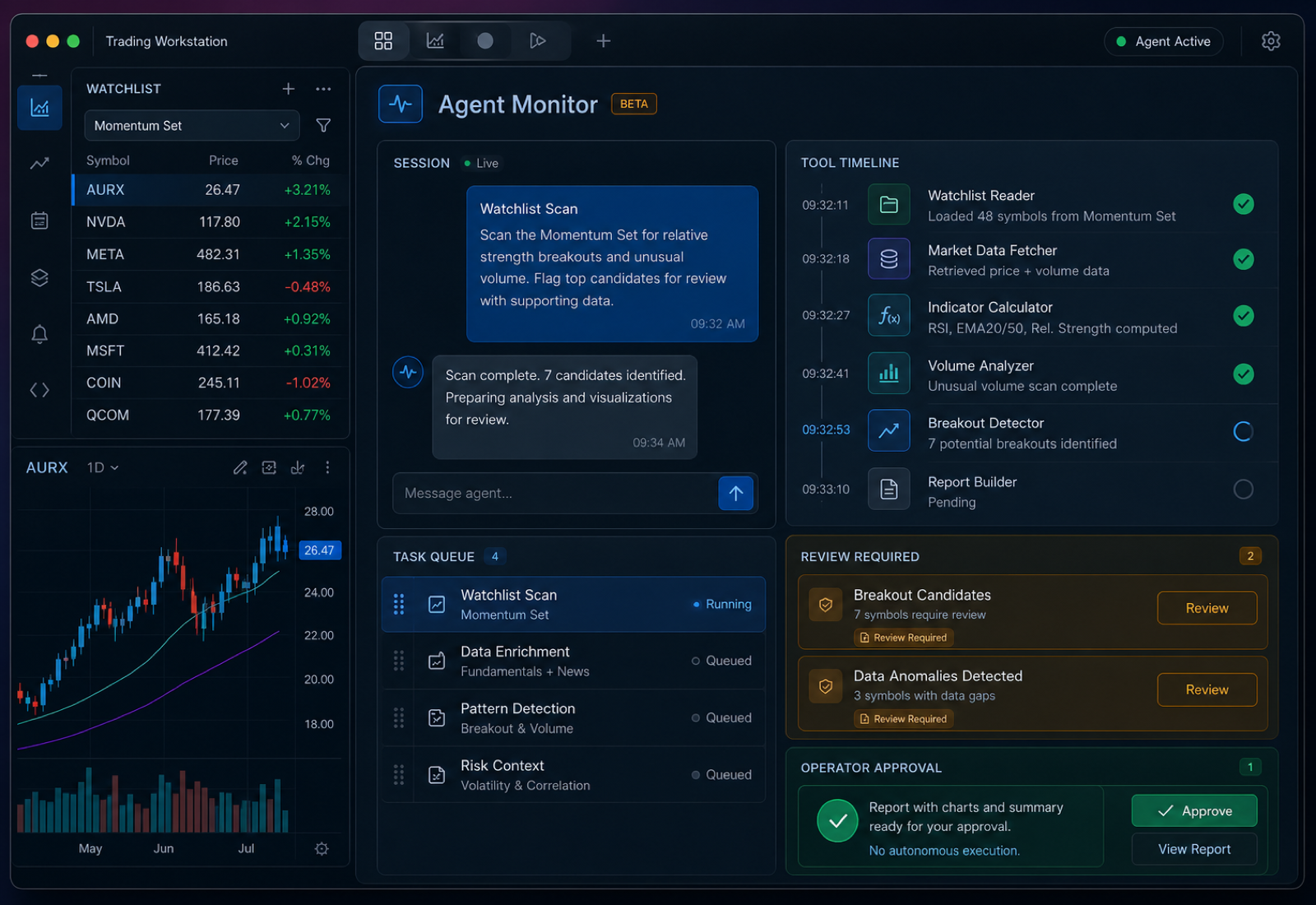
The monitor can inspect context and run routines, but important actions stay visible and approval-gated.
Use the agent panel for chart-aware questions, watchlist scans, and recurring monitor tasks. Tool calls are surfaced as part of the workflow so you can see what was checked, what changed, and what still needs your judgment.
Watchlist scan routines
Trigger scans from the app or CLI and review the resulting context before acting.
Session continuity
Resume monitor sessions and keep analysis tied to the current workspace state.
Remote command beta
Pair Telegram for optional command access when away from the desk; treat it as a beta channel.
Tool timeline visibility
Keep agent activity observable instead of hiding work behind a single opaque answer.
Local MCP bridge
Connect Codex-compatible clients to AITrader tools without turning the app into a hosted trading service.
Safety
Execution stays under operator control
TradingPlan AI is designed around reviewable actions, local credentials, and explicit trading gates.
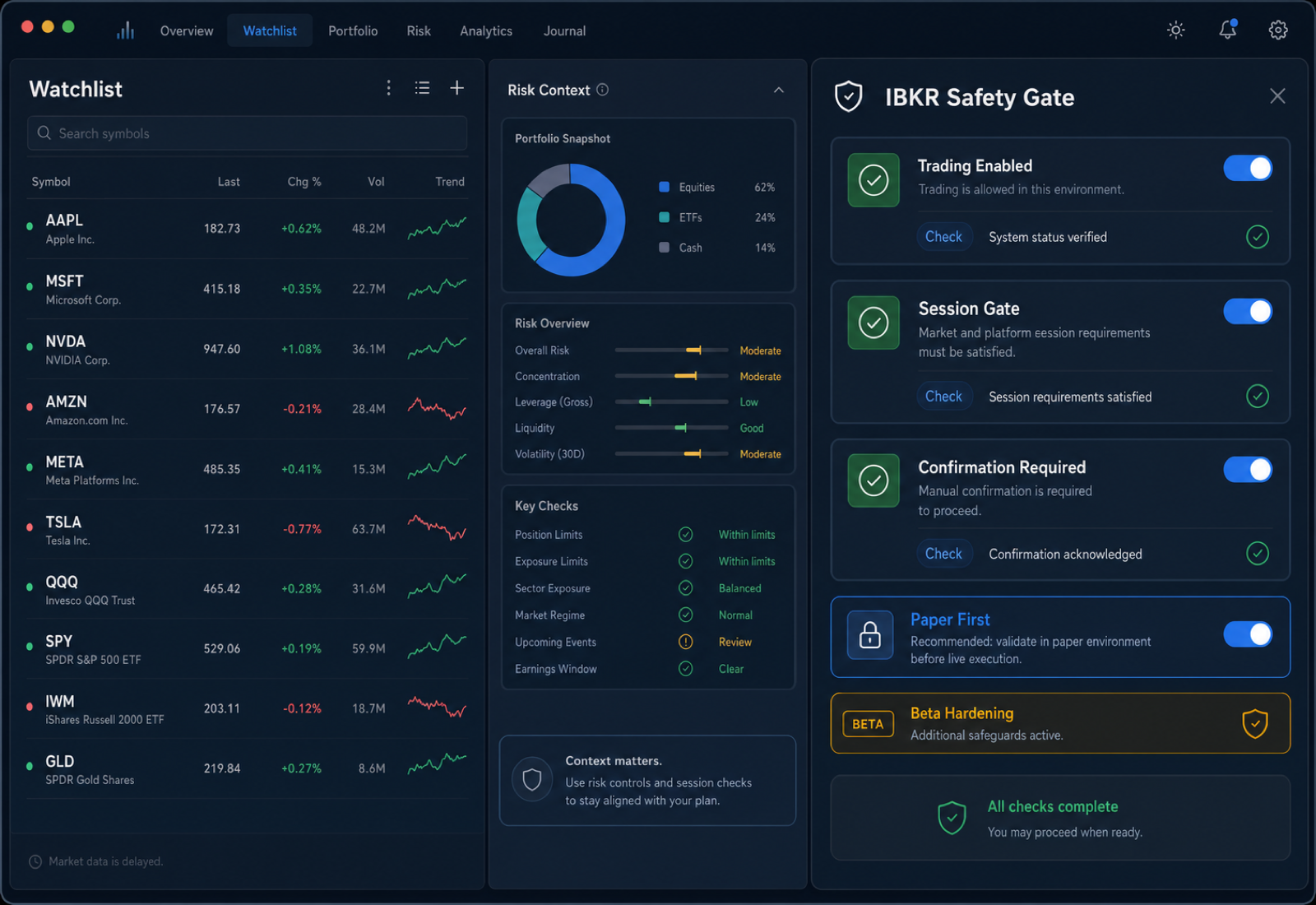
IBKR workflows are built for paper/live routing, account context, portfolio checks, and explicit confirmation. The product should never be described as an autonomous trading system.
Local credentials and logs
You manage provider keys, broker credentials, configuration, and logs from your local environment.
Session trading gate
Trading commands require an enabled trading setting and a session-level trading toggle.
Explicit confirmation
Order and cancellation flows require confirmation instead of silent execution.
Beta hardening disclosed
IBKR market-data and broker integrations are active beta areas with hardening still in progress.
Plan → Test → Review
Turn rules into repeatable workflows
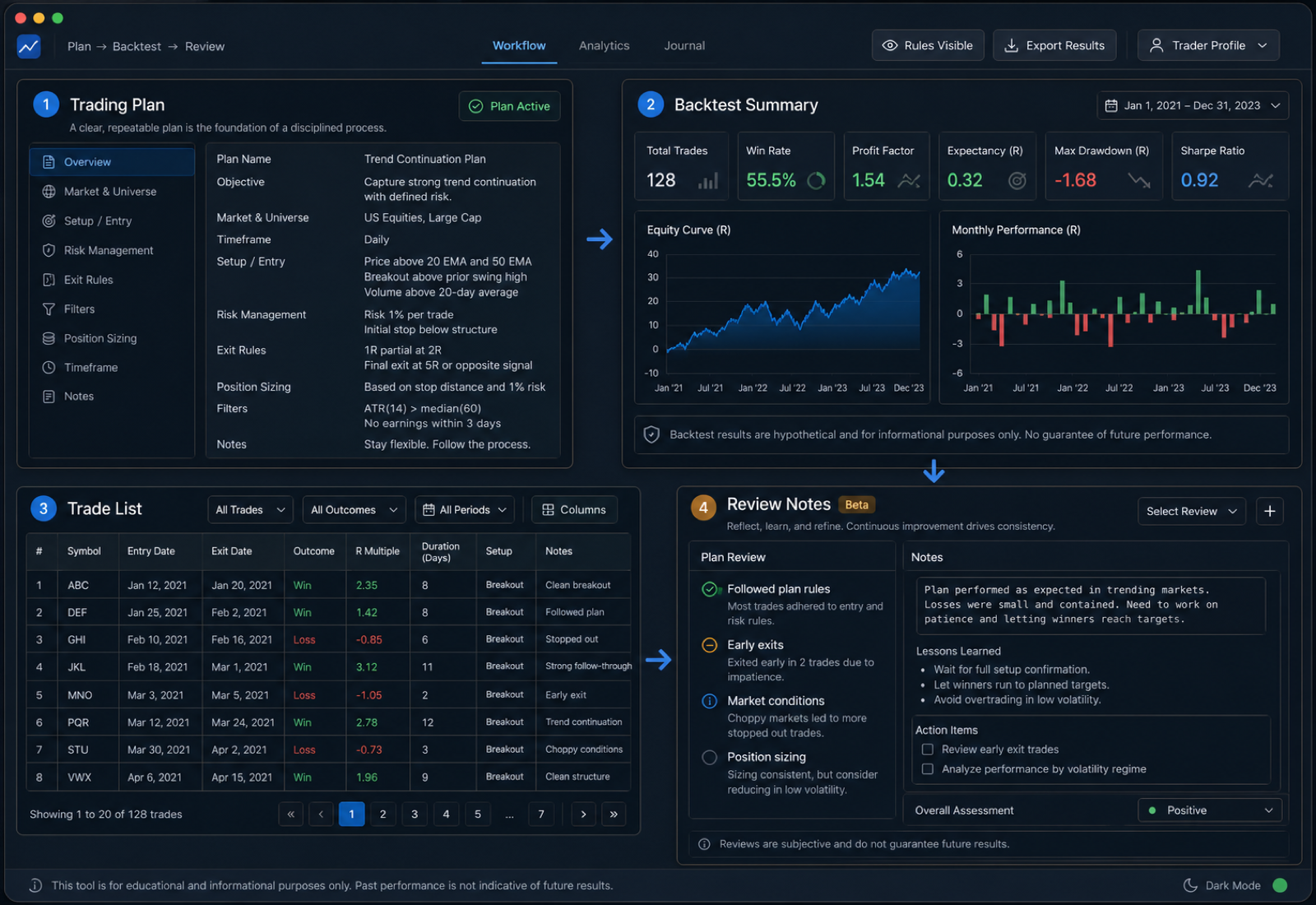
Use trading plans and backtests to make decision rules visible before execution.
Define your rules as trading plan settings, run backtests to validate assumptions, and use the review loop to refine your process over time.
Trading plan defaults
Reusable plans seed risk, stop, target, and entry-basis settings.
Backtest summaries and exports
Run simulations and inspect summaries, trades, and exported results.
Trader Profile analytics
Use imported execution history and analytics to study behavior over time.
Journal workflows in beta
Journal surfaces are part of the review loop, with full CRUD/persistence still treated as beta work.
Closed beta
What is live, beta, and still being hardened
The beta is useful today, but we want to be direct about partial areas and active hardening work.
Chart workspace
Multi-pane charting, drawings, markers, overlays, timeframe controls, and in-window sync are implemented.
Watchlists
Multi-list watchlists, CRUD, import/export, navigation, and quote columns are implemented.
Backtesting
Backtest engine, sidebar workflow, CLI commands, summaries, trade inspection, and export are implemented.
Trading plans
Named plan storage, active plan selection, CLI access, and backtest-default integration are implemented.
IBKR trading
Orders, portfolio, options, and safety gates are implemented; broker/data hardening remains active beta work.
Agent monitor
Sessions, monitor commands, tool timelines, and streaming are implemented; chat presentation polish remains a known UX gap.
MCP server
A local MCP bridge exposes trading workspace tools for trusted clients; tool coverage and route parity are active beta areas.
Telegram commands
Pairing, allowlist, and command routing exist; treat remote control as optional beta functionality.
Journal / Account UI
Journal CRUD/persistence and dedicated Account window completeness are not marketed as finished.
FAQ
Questions before joining the beta
Straight answers about local operation, broker access, AI providers, and trading control.
Is TradingPlan AI autonomous?
No. The product is designed for AI-assisted analysis and monitoring with operator approval. Trading actions stay behind explicit controls and confirmations.
What runs locally?
The macOS app, workspace state, logs, configuration, and provider credentials are designed around local-first operation. External AI, broker, or data-provider APIs are used only when you configure them.
Which broker is supported?
The beta focuses on IBKR workflows with approval gates. Broker and market-data hardening are active beta work.
Do I need my own AI provider key?
Yes. The product is positioned around bring-your-own provider credentials rather than a bundled hosted AI account.
Is Telegram required?
No. Telegram is an optional beta remote command channel for paired users.
What is the MCP feature?
MCP is the local tool bridge that lets trusted agent clients inspect charts, market data, watchlists, plans, account state, and backtests through explicit tool calls. It is powerful, local, and still treated as beta infrastructure.
Is the journal complete?
Journal and account review workflows are part of the product direction, but full journal CRUD/persistence should be treated as in-progress beta work.
Join the closed beta
Tell us you want access to the macOS app. We are prioritizing traders who value local control, explicit execution gates, and reviewable workflows.